Reserving the Biofire Smart Gun secures your place in the manufacturing queue with a deposit and allows you to customize your configuration before production begins. Understanding your reservation details and confirmation process helps you track your order and make updates as needed.
Reservation Deposit
You will make an initial deposit when you complete your reservation. The deposit amount will depend on your specific Smart Gun configuration and added accessories. This deposit is fully refundable and secures your place in line for your batch. Your Smart Gun build is part of the current Batch when you make your reservation, and you are entered into the queue within your specific Batch.
You can view your order details at any time at smartgun.com/account. You will also receive a confirmation email with order details.
Confirmation Email
You will receive a detailed confirmation email from [email protected] after placing your reservation, which includes:
Reservation Details
- Your unique reservation number
- 6 characters case sensitive
- The date you placed your reservation
- Your Smart Gun Batch (e.g., Batch 5)
Order Summary
- Your Smart Gun configuration (polymer, trigger, etc.)
- Selected accessories (magazines, hard case, etc.)
- Individual pricing for each item
- Total cost breakdown
Payment Information
- Deposit amount charged
- Remaining payment due at finalization
Billing Information
- Payment method used (last 4 digits shown)
- Billing address on file
Shipping Details
- Expected shipping timeframe
- Shipping method
- Shipping address (accessories)
Note that your Smart Gun shipping address will be confirmed prior to shipping as a part of finalization.
Reservation Details Page
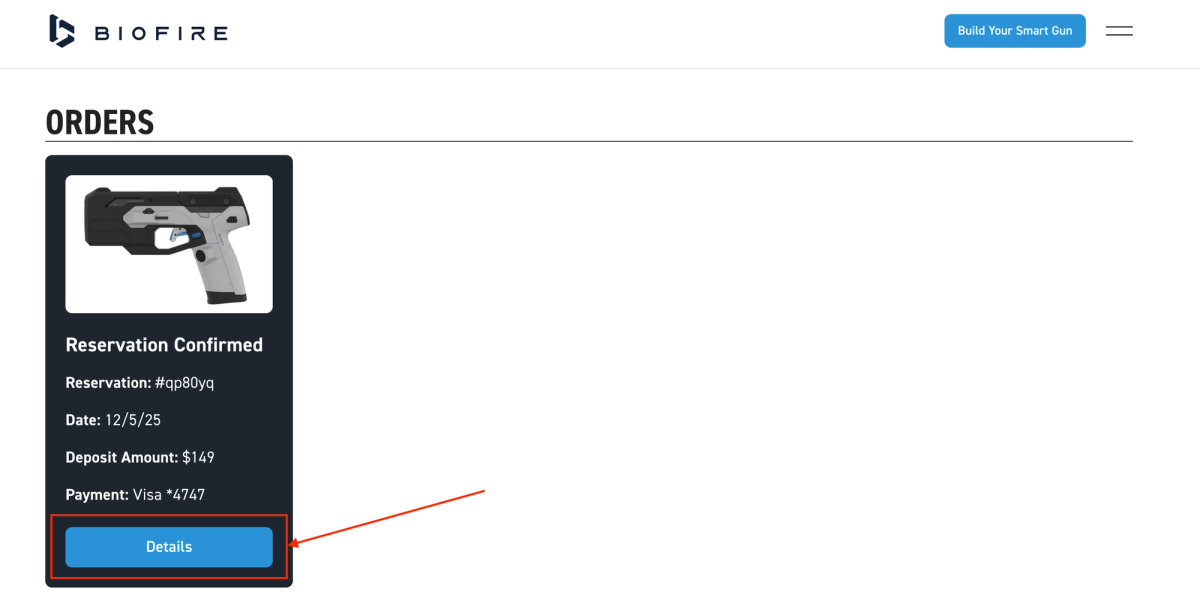
Reservation information is accessible at smartgun.com/account, where you can view all current orders and saved builds. Each order will have a unique order number. Click "Details" in the "Orders" section to navigate to the "Reservation Details" page.
Flexibility Before Finalization
Your configuration isn't set in stone when initially placing your order. You have the flexibility to modify your configuration after placing your reservation. Your Smart Gun build and accessory selections can be edited as many times as needed before your order is finalized.
Please refer to the Editing Your Smart Gun Build article for a full list of what you can modify.
Finalization
Biofire will invite you to finalize your order when preparing to manufacture your firearm. Confirm or update critical details like payment information and shipping addresses during finalization. Your configuration is locked in and cannot be changed once you complete finalization by making final payment.
Please refer to the Finalizing Your Smart Gun Order article for more details.
Next Steps
Watch for email updates about your reservation status. You'll receive a notification with instructions to complete your order and arrange for final delivery when your batch is ready for finalization.