The Smart Gun uses a minimalistic graphical user interface to communicate important information about the status of the Smart Gun, such as authentication status, alert indicators or low battery warnings. The user interface is designed for the user to have a clear understanding of what is going on with their Smart Gun in real time with minimal distractions.
Please refer to your Product Manual and The Smart Gun System article for complete information on the Smart Gun system, status displays, and troubleshooting.
Smart Gun Communication
The Smart Gun provides key information about:
- Whether the Smart Gun is on or off (please refer to the Smart Gun States article)
- Authentication status (armed or disarmed)
- Battery charge level
- System notices, warnings, and errors
Two primary interface locations on the firearm display this information.
Primary Interfaces
Front Sight
The front sight is located on the flyover cover at the front of the Smart Gun and has an indicator that shows the core operational status of the Smart Gun at a glance. The front sight provides a quick visual reference for the Smart Gun's operational status.
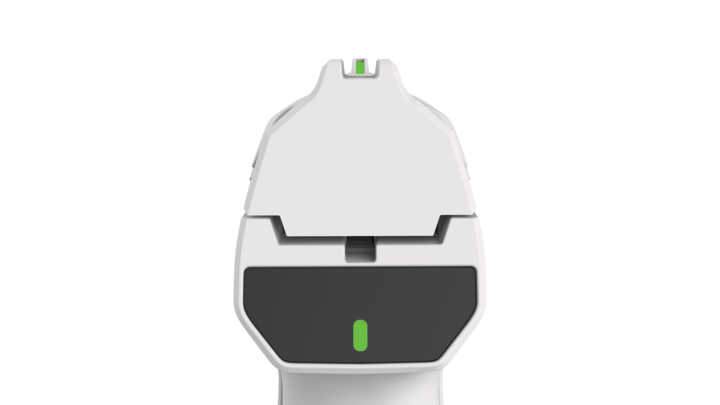
Rear Display
The rear display provides comprehensive status information through three distinct indicator zones:
- Status Indicator (Center)
Mirrors the front sight indicator to show system state and authentication status
- Alert Indicator (Right)
Displays notices, warnings, or critical errors
- Battery Indicator (Left)
Shows the battery's charge status. Note that this will only be on if the battery reaches 50% or below
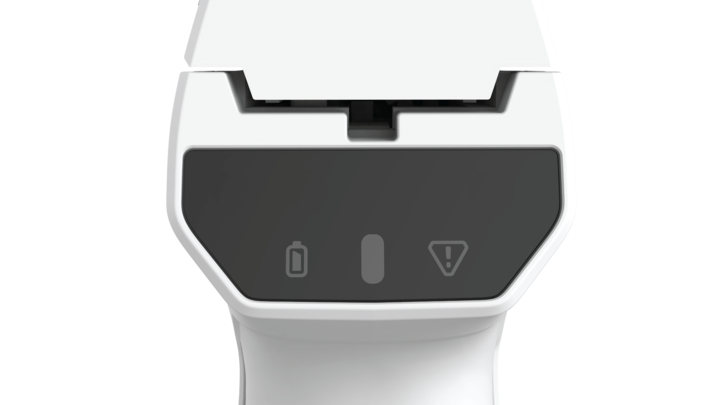
These indicators provide a combined view of the Smart Gun's operational condition.
Always make sure that users understand the functionality of the firearm before handling or using the Smart Gun.
Please refer to the Smart Gun Indicators and Smart Gun States articles for more information about what each indicator represents.