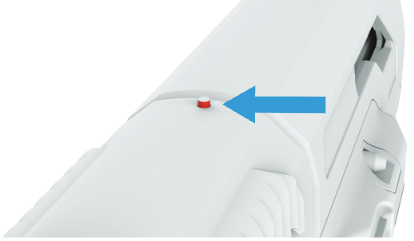
The Biofire Smart Gun includes a mechanical loaded chamber indicator, also referred to as LCI, that provides a visual signal when a round is present in the chamber. This feature improves situational awareness and supports safer handling.
- The loaded chamber indicator is a small mechanical post located on the slide cover of your Smart Gun
- The loaded chamber indicator is designed to visually indicate whether a live round is present in the chamber

WARNING:NEVER rely solely on the Loaded Chamber Indicator to determine whether your Smart Gun is loaded or unloaded.
Please refer to page 23 of your Product Manual for more information on the loaded chamber indicator.
Important Safety Reminder
Never replace safe firearm practices with reliance on the loaded chamber indicator alone. The loaded chamber indicator is a helpful tool and should be used alongside proper safety procedures, not in place of them.
WARNING:
Handle your Smart Gun safely and responsibly at all times. Failure to follow proper firearm safety practices can lead to injury, death, and/or damage.
- Keep the muzzle of your Smart Gun pointed in a safe direction at all times.
- Keep your finger off the trigger of your Smart Gun until ready to fire.
- Only point the Smart Gun at intended targets, and always know your target and what lies beyond your target.
- Always treat your Smart Gun as if it is loaded, even after clearing it.
- Make sure your Smart Gun is unloaded and clear before any cleaning or service and always wear eye protection when cleaning or servicing your Smart Gun.
- Always read and follow the Product Manual.
Reading the Indicator
Look for the markings near the indicator:
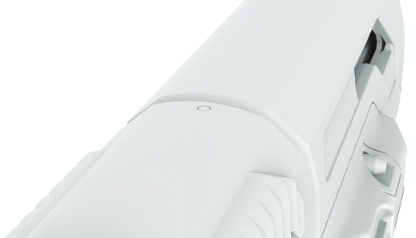
- A small circle symbol highlights the post area
When no round is present:
- The indicator post remains down
- The chamber is empty
When a round is chambered:
- The indicator post pops up
- A red tip becomes visible, signaling the Smart Gun is loaded